Built for the people who have to sign off on it.
Comp data is pay data. Here is how access, changes, evidence, AI and hosting work, in the detail a security review asks for.
Your identity provider decides who gets in.
Single sign-on with SAML, so Okta, Entra or any IdP you already run controls accounts and MFA. Password login can be limited to super admins, or kept for everyone during a pilot.
- ✓ Access is granted per resource: each page and each table has read, write, delete and configure levels, assigned to groups
- ✓ A rep sees only their own data, enforced in every query the app runs, including the ones the AI assistants run on their behalf
- ✓ Managers see their team through the reporting hierarchy, nothing beside it
- ✓ Login lockout and password-reset limits are per client address, reset links are single use and hashed at rest
- ✓ Superuser accounts can only be changed by superusers; nobody can deactivate themselves or remove their own admin access
Every change has a name, a time, and a before and after.
The audit trail records who changed what and when, with the old and new values, for data edits, plan changes, runs, overrides and every write an assistant makes.
- ✓ Maker-checker per table: the maker proposes a cell edit, insert or import, a reviewer from the groups you choose approves it, and nobody approves their own
- ✓ The assistant writes only after a confirmation card showing old and new; each write is logged and revertable
- ✓ A period lock snapshots exactly what went to payroll; a later change to a locked month pays as an adjustment in the next file, never by rewriting history
- ✓ Plan documents are frozen per person with a SHA-256 of the signed copy; amendments are new documents, the signed one does not change
- ✓ Rate tables are versioned by effective date, so what paid a given month is on record
The audit binder is built while you close, not after.
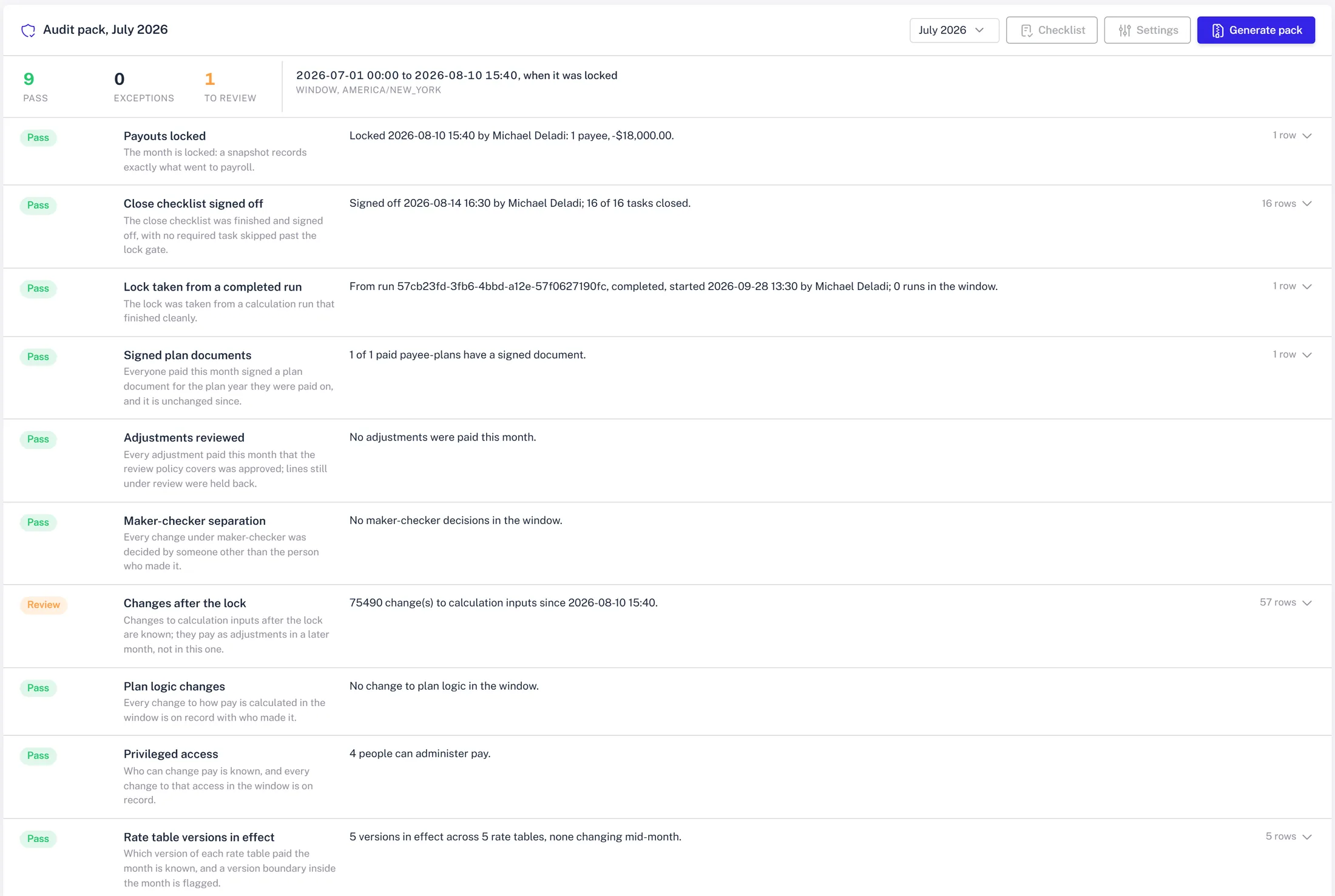
A SOX audit pack per period runs nine controls over the window from period start to the lock, marks each pass, exception or review, and zips the evidence with a manifest of hashes.
- ✓ Controls include: lock in place and before payout, close signed off, lock from a completed run, every paid rep on a signed plan, adjustments reviewed, maker-checker separation, changes after the lock, plan logic changes, privileged access, rate versions in effect
- ✓ Each control has its own severity and settings; the pack carries the configuration it ran with
- ✓ A golden book of sixteen payees and 261 payment lines worked by hand runs on every release; a cent off and the release does not ship
- ✓ Any two calculation runs can be set side by side, payee by component, with the edits made between them
- ✓ Scheduled audits you describe in plain English run in a sandbox and track each finding until it is resolved
Read-only by default. Grounded in your rows. Logged.
The assistants answer from your live tables and cite them. They do not write unless you confirm on a card, and reps only ever reach their own data.
- ✓ Models are called through Anthropic's API; under its commercial terms your data is not used to train models
- ✓ Rep-facing assistants carry tools scoped to the rep: their statement, their deals, their pipeline
- ✓ Custom assistants you define get read, analyze and connect tools only; write tools are not grantable
- ✓ Scheduled audits written by the assistant run as code you can read, in a sandbox, against your real tables
- ✓ MCP keys for Claude, Cursor or other clients act as a named user with the same access checks as the app, are hashed at rest, scoped to the tools you choose, expiring, revocable and logged on every call
Your cloud, your server, or a laptop for the pilot.
The stack is Postgres, Redis and a handful of containers. It runs wherever you need it to.
- ✓ In your own AWS account from a Terraform kit: ECS Fargate services, RDS Postgres, a load balancer with TLS, alarms, and an ops script for rollouts
- ✓ On a single server with Docker Compose and Let's Encrypt, which is how the demo runs
- ✓ On a workstation on your LAN for a pilot, with the same images
- ✓ Integrations connect outbound over HTTPS with the credentials you grant; Salesforce pushes changes to an endpoint scoped to the feed
- ✓ Backups, retention and data residency follow the platform you choose and are set up with you at install
No third-party attestation yet. Here is what we can show today.
We are early. There is no SOC 2 report to hand you. What we have is a product that produces its own evidence, and a demo you can audit.
A real audit pack
Download the July pack from the demo book: the controls workbook, the payroll file, a signed plan document, the checklist evidence, and a manifest of hashes. sample-audit-pack.zip
A review on your terms
Bring your security questionnaire to the demo. Anything above you want to see rather than read, we will show live. Book it →