1.Why commissions are in scope
Sales compensation is usually the second largest line in a go-to-market P&L, it is calculated from data that changes daily, and the people who run it can also change the rules. That combination is exactly what Sarbanes-Oxley section 404 is about: can management show that the number on the income statement came out of a controlled process, and that nobody could change it alone and unseen?
In practice the auditor is not re-performing your plan math. They are asking for evidence that a defined process ran, that the inputs and the logic were what you say they were for the period, and that every change and every exception was reviewed by someone other than the person who made it.
2.The window the controls run over
Every control needs a window. Ours runs from the start of the period to the moment the period was locked, that is, the moment the numbers were sent to payroll. Decisions and changes inside the window belong to the period. Changes that arrive after the lock are not a failure of the period; they are their own control, because they will pay as prior-period adjustments in a later month.
That distinction matters. An auditor who sees a Salesforce sync write seventy-five thousand changes the day after lock should see them flagged for review, not hidden, and should see them land as adjustments in the next open month with their own approvals.
3.The nine controls
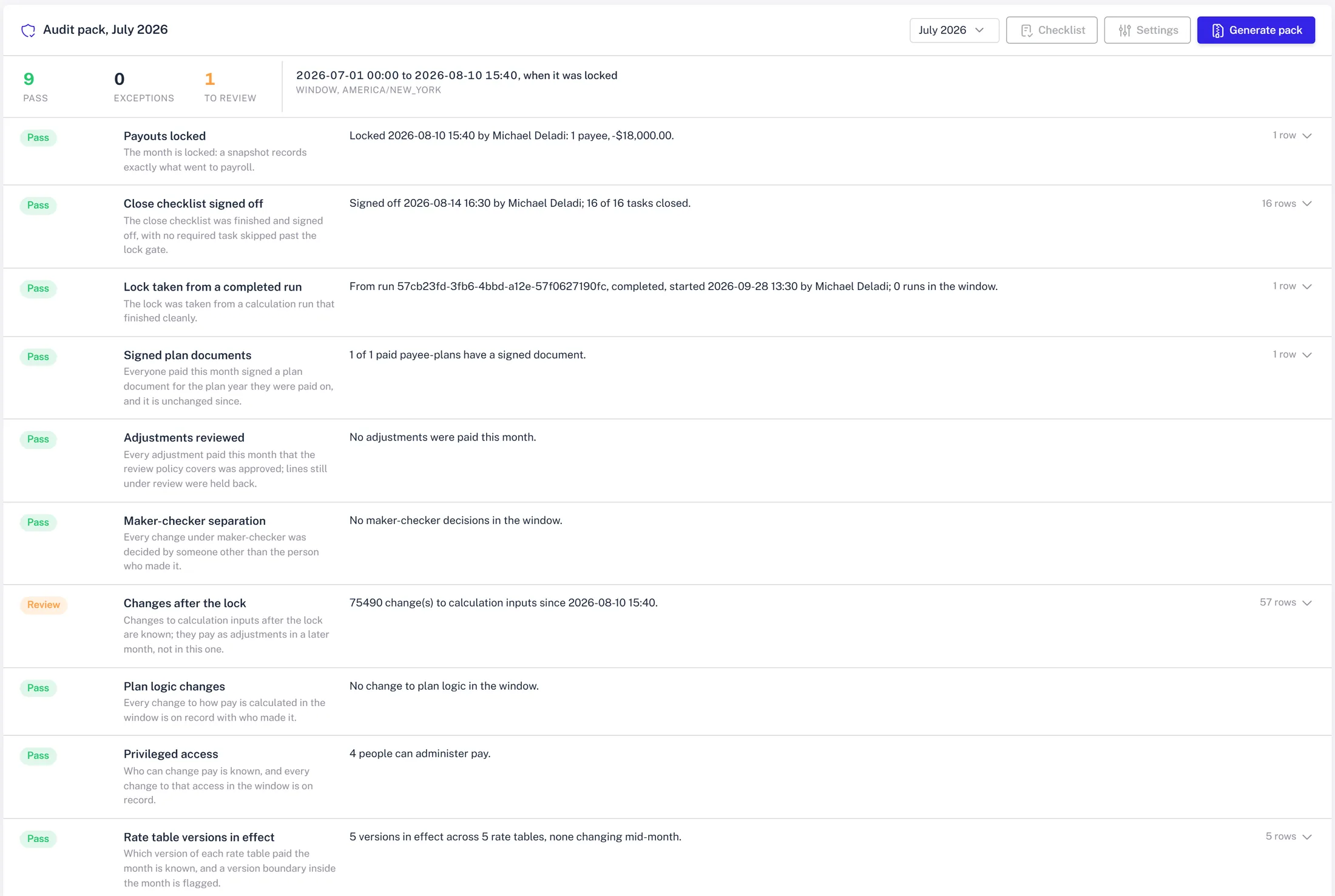
Each control has a severity, so a failure counts either as an exception or as something to review, and each one records the rows that made it fail.
- ✓Period locked. A lock exists and was taken on or before the payout date. Without it, nothing else can be tested against a fixed number.
- ✓Close signed off. The close was signed off with no required task still open and no override of the lock gate.
- ✓Calculation completed. The run the lock was taken from finished without error. A lock on a half-finished run is the classic way to pay the wrong number.
- ✓Signed plan for every paid rep. Every payee with a non-zero line has a signed plan document for the fiscal year, for the plan they were paid on, and the stored document hash still matches the rendered text.
- ✓Adjustments reviewed. Manual and prior-period lines above a review threshold carry an approved adjustment review. Reviews still pending count as review, not pass.
- ✓Maker is not checker. Every approved data change and every capitalization run was approved by someone other than its author.
- ✓Changes after the lock. Input changes written after the lock are counted and listed, because they will pay later as adjustments.
- ✓Plan logic unchanged in the window. Any edit to the flow or its steps inside the period is listed with who and when, so a mid-period logic change is a reviewed event, not a surprise.
- ✓Rate versions in effect. The rate table versions that paid the period are named, with their effective dates, so a promoted plan change is visible in the pack.
4.What the evidence looks like
A control that only says pass is not evidence. Each control writes the rows behind its result: the lock record and timestamp, the sign-off and who gave it, the run id, the list of payees and their document hashes, the adjustment reviews with decisions, the change log entries with maker and checker.
The pack itself is a zip with a controls workbook, the payroll file as it went out, the signed plan documents, the close checklist with its evidence, and a manifest of file hashes. The zip's own hash is stored, so a pack handed over in March can be shown to be the pack generated in October.
5.Generate it from the close, not in April
The pack can be generated by hand from the close page, or automatically at sign-off or at lock. The point of automation is not convenience. It is that the pack is produced at the moment the period's state is fixed, by the system, rather than assembled months later by a person reconstructing what happened.
On the demo book, July produced eight passes and one review: the post-lock Salesforce changes. August, which is still open, shows three exceptions: not locked, not signed off, and a capitalization run self-approved by a superuser. That is the pack doing its job before the auditor arrives.
6.Make it yours
Controls are configurable: each can be enabled, ordered, given a severity and settings, and you can add your own as read-only SQL that passes or fails on rows. The window start can be the period start or the previous lock, the window end the lock, the period end or now. The files in the pack and the time zone are settings too.
Start with the nine. Then add the one control your auditor asked about last year that you answered with a spreadsheet.