1.Why closes slip
A commission close is a dependency chain. The payroll file cannot go until payouts are locked; payouts cannot lock until audits are clear and inquiries are answered; audits cannot run until the calculation ran; the calculation is wrong until the last import landed. When the chain lives in people's heads, the close is as fast as the slowest reply to a Slack message.
A checklist fixes the first problem, which is knowing what is left. It does not fix the second, which is finding out. That takes tasks that know how to check themselves.
2.The sixteen tasks
The monthly template on the demo book. Your own will differ, but the shape is common to almost every comp team.
- ✓Source data imported (automatic: the Salesforce import for the period landed)
- ✓Roster and HR changes loaded (manual)
- ✓Calculation run completed (automatic)
- ✓Scheduled audits clear (automatic: no open findings on the period)
- ✓Anomalies reviewed (manual)
- ✓Adjustments reviewed (automatic: every manual or prior-period line above the threshold has an approved review)
- ✓Rep inquiries answered (automatic: no inquiry on the period waiting on the team)
- ✓Approvals collected (automatic: pending data changes approved)
- ✓Plan documents signed for every paid rep (automatic)
- ✓Manager review of statements (manual)
- ✓Payouts locked (automatic: the lock exists)
- ✓Payroll file produced (automatic)
- ✓Payroll file delivered to HR (manual)
- ✓Statements sent to reps (automatic: emailed at close, logged per payee)
- ✓Capitalization run approved (manual)
- ✓Close signed off (the sign-off itself, refused while a required task is open)
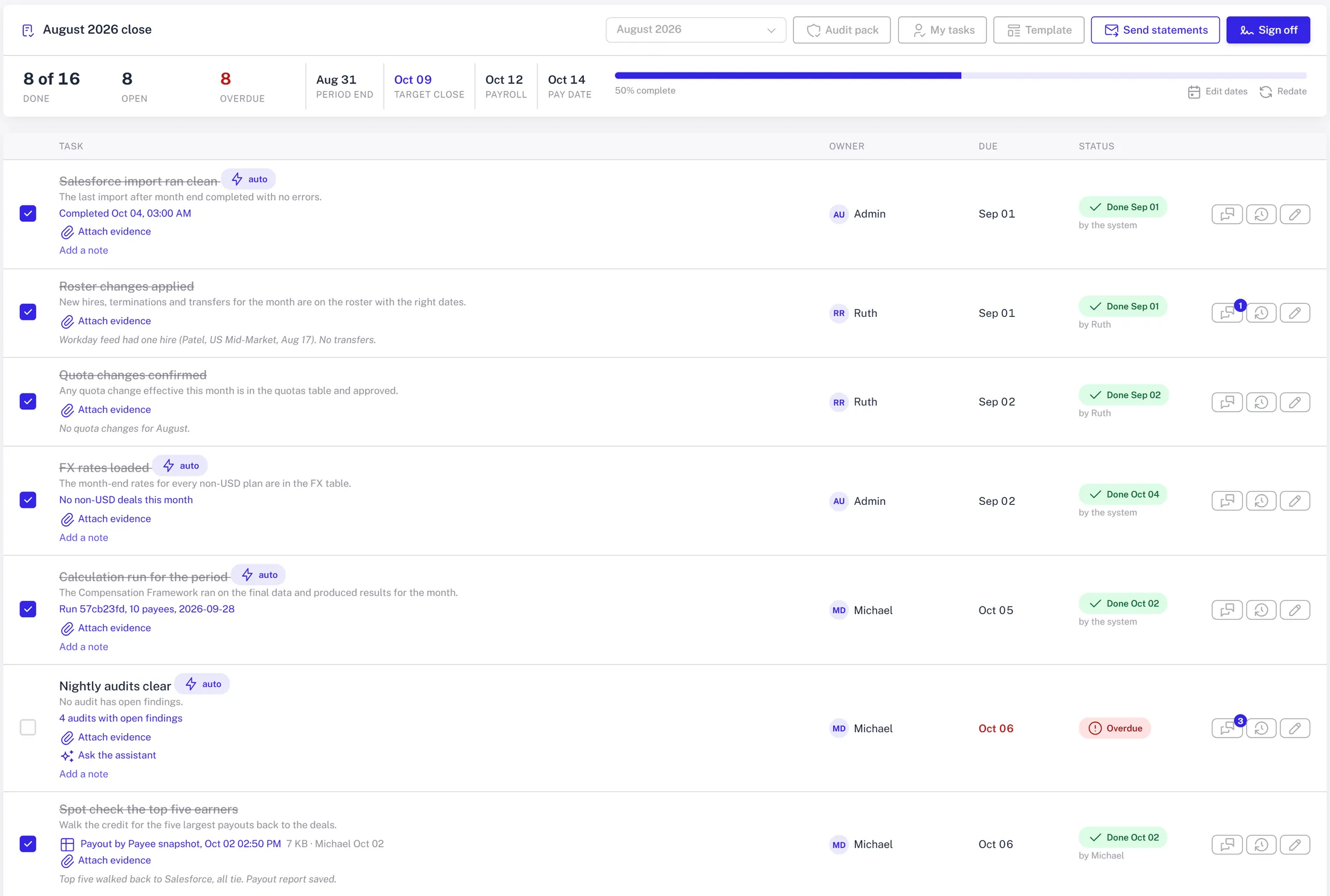
3.Tasks that close themselves
Ten of the sixteen complete on evidence rather than on someone's word. Each automatic task has a rule. When the rule is met, the task is marked done with a link to the evidence: the import run, the calculation id, the empty findings list, the lock record. When it is not met, the task stays open and shows the reason, for example 'two inquiries waiting on the team'.
The rules are evaluated every time the page is opened and every time a task is reopened, so the checklist is never stale. Nobody has to remember to tick 'calculation ran'.
4.Dates off the close calendar
Each fiscal month has a close target date, a payroll submission date and a payout date. Template tasks are dated relative to one of those anchors: 'payroll file produced' is one business day before payroll submission, 'statements sent' is the payout date. When the calendar moves, one click re-dates the open tasks.
Reminders go out each weekday morning, in the app and in Slack, one message per person listing what is overdue and due today. Unowned tasks fall to the comp admin group so nothing is silently nobody's.
5.Owners, not a column of initials
Owners are set on the template and can be changed per period. Several people can own a task. The owner cell is the control, so reassigning is one click in place, not a form.
The combination of an owner, a due date and a reminder is what turns a checklist from a record into a schedule.
6.Sign-off that means something
The last task is the sign-off, and it refuses while any required task is open. That refusal is the control. It is what lets the audit pack say 'close signed off with no required task open' and have it be true by construction.
The lock, when it happens, snapshots exactly what went to payroll. Anything that changes afterwards pays as an adjustment in the next open month. The checklist and the lock together are why the close can end on a date rather than when the questions stop.