1.Start from the lock
A payroll file is a view of a locked month. Never produce it from a live calculation: the run may change between the moment you export and the moment payroll imports, and then the statement, the ledger and the paycheck disagree. The file reads the payment lines as they were snapshotted at lock, by payee and component, plus the adjustments that fell into this month.
That also means the file for any past month can be regenerated byte for byte, which matters when payroll asks for it again in audit season.
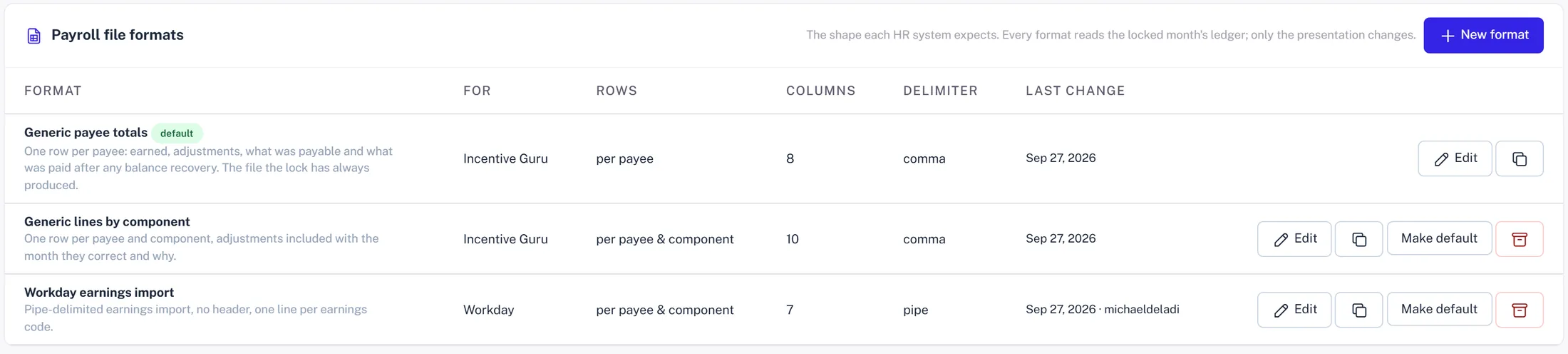
2.Two generic shapes
Most payroll teams accept one of two shapes. Totals: one row per payee with the employee number and the month's total. Lines: one row per payee per component, so commission, kicker and bonus arrive as separate earnings. Lines are better. They let payroll apply different tax treatment or GL codes per earning type, and they make the paycheck match the statement.
Both start from the same vocabulary: who (employee number, name, payee id), when (pay month, source period), what (component, kind, plan), money (amount, sign, currency), and fixed values the HR system insists on.
3.A Workday earnings import
Workday's earnings import is a good example of why the format has to be configurable rather than coded. The one on the demo book:
- ✓Pipe delimited, no header row.
- ✓Employee number from the HR attribute, not the payee id.
- ✓An earnings code per component: COMM_ACV, COMM_IACV, COMM_PSF, BONUS_H1. Prior-period adjustments map to ADJ.
- ✓Amounts as absolute values with a separate sign column, because the import rejects a minus sign.
- ✓Filename WD_EARN_{pay month}_{today}.txt, which is what their scheduler expects to find.
4.ADP and everyone else
ADP's paydata imports are comma separated with a header, want the company code and file number, and take the earnings as a code and an amount column pair. Paylocity, Paycom, Rippling and the rest each have their own spelling. None of them are hard. All of them are different, and the differences are exactly the things a hard-coded exporter gets wrong: delimiter, header, code mapping, negative handling, date format, filename.
So the format is a definition: a list of columns, each drawn from the vocabulary with an optional format string, three mapping tables for components, kinds and plans to the codes the HR system uses, and the file settings. Copy a preset, change the codes, save.
5.Preview against a real month
Before the first live file, preview the format against a locked month. The preview shows the table, the raw text exactly as it will be written, and warnings: a component with no code mapping, an employee with no number, an amount that would be negative in a format that forbids it. Fix the mapping, preview again.
Then the file is a dropdown on the month's payroll page and on the payments ledger, next to the two generic shapes. Pick the format, download, send. The file that went out is stored with the month.
6.A checklist item, not a scramble
'Payroll file produced' is one of the automatic tasks on the close checklist, dated one business day before payroll submission. Delivery to HR is the manual task after it. When SFTP delivery is wired, that one becomes automatic too, and the close ends with a confirmation rather than an email.