1.The bug every spreadsheet has
A rate table in a spreadsheet is a range of cells. When the committee changes the accelerator in July, someone edits the cells. From that moment every recalculation, including the one that reproduces January for an inquiry or an audit, uses the July bands. January no longer reproduces. The number paid in January is now unexplainable from the current logic.
Most ICM tools have the same bug with a nicer interface: the rate table is a single object, and editing it edits history.
2.Versions with effective dates
The fix is boring and strict. A rate table is a name. Under the name are versions, each with its bands, a version number, and an effective start and end date. Editing the plan does not edit a version; it adds one. The previous version gets an end date the day before.
Every table starts with a version zero that holds the bands as they were before versioning existed, effective from the beginning of time, so the first version is never a special case.
3.The as-of join
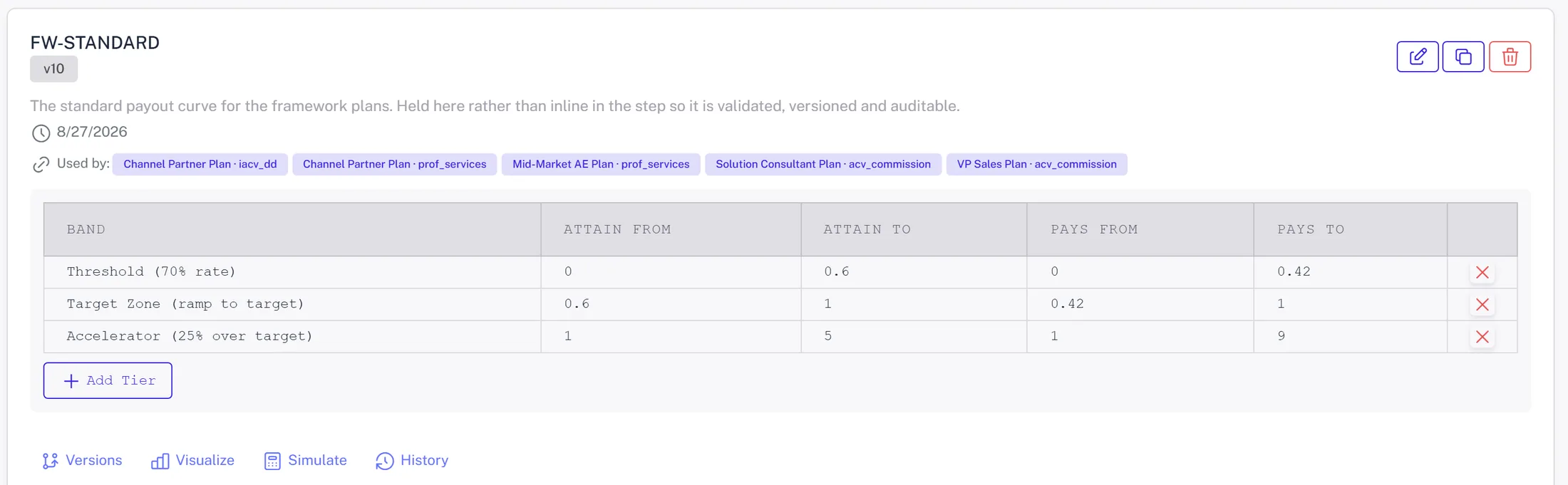
The engine does not read 'the rate table'. For each deal it asks: which version of this table was in effect on the close date? That is an as-of join: match the table name, pick the version whose date range contains the close month, latest if two overlap. The version number rides along on the result, so every payout line knows it was paid on FW-STANDARD at version ten.
Done this way, recalculating January in December produces January's number, because January's deals still join to January's version. The inquiry, the restatement and the audit all reproduce.
4.What a promotion is
When a modeled plan change is promoted from a scenario, the promotion is simply a new version with an effective start on the month the committee chose. Nothing else changes. Earlier months keep paying on the earlier version. The next run's diff shows who moved and by how much. Undoing a promotion is ending the version.
This is also why modeling on a fork and promoting is safer than editing in place: the scenario tested exactly the bands that become the new version.
5.Keep the curve outside the steps
Rate tables live outside the calculation steps for the same reason. A step says 'look up the band for this attainment in table FW-STANDARD'. It does not contain the numbers. So a scenario can change a band without touching a step, five plan components can share one table, and the table can be validated on its own: bands must be contiguous, bounds must be fractions, the upper bound wins at a boundary.
Put the numbers in the steps and every plan change is a logic change that needs a developer and a regression test.
6.The control
The audit pack has a control for this: it names the rate versions in effect for the period, with their dates. Combined with the control that lists plan logic changes inside the window, the auditor can see that July was paid on version eleven, that version eleven was created on June 28 by a named user from a named scenario, and that January was untouched.
That is what 'the plan changed mid-year' should look like in a SOX binder.